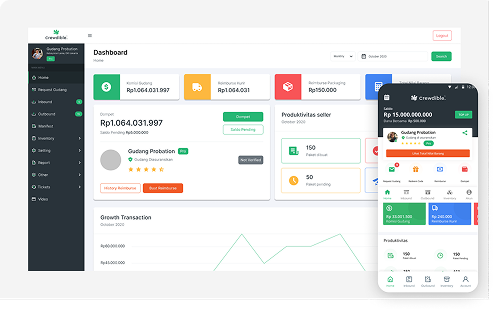
Warehouse Management System
Designed a complex warehouse management system to streamline inbound, outbound, inventory, and stock opname processes.
I designed a system that focuses on clarity, structure, and scalability. Warehouse operations are highly complex and often rely on fragmented systems or manual processes. The goal was to simplify complex warehouse workflows, reduce operational errors, improve efficiency, and create a scalable, consistent system for all users.
Problem
Warehouse operations are highly complex and often rely on fragmented systems or manual processes.
- Multiple workflows (inbound, outbound, inventory) are disconnected
- High risk of human error during stock handling
- Difficult for operators to track real-time inventory
- Interfaces are often cluttered and hard to use
Users
- Warehouse Admin
- Warehouse Operator
- Supervisor / Manager
Research & Insights
From internal discussions and workflow analysis:
- Users prefer simple step-by-step flows rather than complex dashboards
- Most users are non-technical operators
- Speed and clarity are more important than visual complexity
- Repetitive tasks need to be optimized and standardized
Solution
I designed a system that focuses on clarity, structure, and scalability:
- Modular workflow (Inbound, Outbound, Inventory, Stock Opname)
- Clear task-based navigation
- Table-based data visualization for fast scanning
- Status indicators to reduce errors
- Reusable design components for consistency
Design Process
Wireframing
Created low-fidelity layouts for each module. Focused on information hierarchy.
UI Design
Designed clean and minimal interfaces. Used consistent spacing and typography.
Design System
Built reusable components: Buttons, Tables, Forms, Status badges.
Collaboration
Worked closely with developers to ensure feasibility. Iterated designs based on feedback.
Key Features
Inbound Management
- Goods receiving flow
- Verification & status tracking
Outbound Management
- Order picking & shipping
- Clear step-by-step process
Inventory Management
- Real-time stock visibility
- Filtering & search
Stock Opname
- Simplified stock checking process
- Reduce mismatch errors
Impact
Overview
Designing a scalable warehouse management system to streamline complex logistics operations including inbound, outbound, inventory, and stock opname.
Role: UI/UX Designer
Duration: 2019 – 2024
Tools: Figma, Design System, FigJam
Challenge
Warehouse operations are highly complex and often rely on fragmented systems or manual processes.
Key challenges:
- Multiple workflows (inbound, outbound, inventory) are disconnected
- High risk of human error during stock handling
- Difficult for operators to track real-time inventory
- Interfaces are often cluttered and hard to use
Users:
- Warehouse Admin
- Warehouse Operator
- Supervisor / Manager
Goals:
- Simplify complex warehouse workflows
- Reduce operational errors
- Improve efficiency and task completion speed
- Create a scalable and consistent system
Solution
I designed a system that focuses on clarity, structure, and scalability:
Key Solutions:
- Modular workflow (Inbound, Outbound, Inventory, Stock Opname)
- Clear task-based navigation
- Table-based data visualization for fast scanning
- Status indicators to reduce errors
- Reusable design components for consistency
Design Process:
1. Wireframing — Created low-fidelity layouts for each module. Focused on information hierarchy.
2. UI Design — Designed clean and minimal interfaces. Used consistent spacing and typography.
3. Design System — Built reusable components: Buttons, Tables, Forms, Status badges.
4. Collaboration — Worked closely with developers to ensure feasibility. Iterated designs based on feedback.
Key Features:
- Inbound Management: Goods receiving flow, Verification & status tracking
- Outbound Management: Order picking & shipping, Clear step-by-step process
- Inventory Management: Real-time stock visibility, Filtering & search
- Stock Opname: Simplified stock checking process, Reduce mismatch errors
Results
Reduced complexity in warehouse operations
Improved usability for non-technical users
Increased efficiency in handling daily tasks
Established a scalable design system for future development